
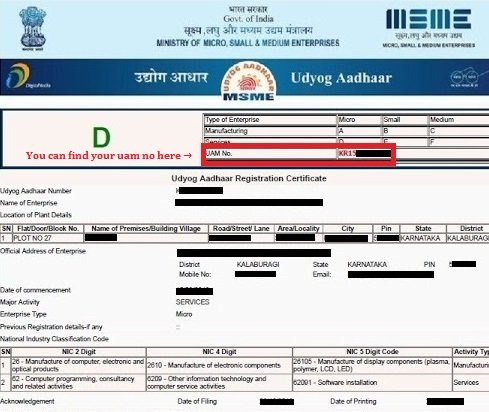
 ↑ Locate your 12-digit UAM number on your existing Udyog Aadhar certificate
What is Udyog Aadhar Download?
Udyog Aadhar Download is the online process of obtaining a printable copy of your Udyog Aadhaar Memorandum (UAM) certificate — the official MSME/SSI registration document issued to Indian micro, small, and medium enterprises between September 2015 and July 2020. Using your unique 12-digit UAM number, you can download, print, and use this certificate as official proof of MSME registration for accessing government benefits, bank loans, subsidies, tax rebates, and government procurement opportunities.
The Udyog Aadhar certificate contains essential business details including your UAM number, enterprise name, owner name, business address, type of organization, social category, and the date of commencement of business. Although Udyog Aadhar was officially replaced by the Udyam Registration system in July 2020, certificates issued under the old scheme remain valid as proof of MSME status, and many businesses still require a printed copy of their original Udyog Aadhar for legacy banking and government records.
How to Download Udyog Aadhar Certificate Online — Step-by-Step Guide
Downloading your Udyog Aadhar certificate is a simple 5-step process that takes less than 5 minutes to complete:
- Fill Applicant Details: Enter your full name (as per PAN card), active 10-digit Indian mobile number, and a valid email ID where the printable certificate will be sent.
- Enter Your UAM Number: Provide your 12-digit Udyog Aadhaar Memorandum (UAM) number. You can locate this number on your original Udyog Aadhar certificate, typically at the top of the document. The format is usually "UAM-XX-XX-XXXXXXX" where the digits identify your state and registration sequence.
- Select Registered State: Choose the Indian state where your business was originally registered under the Udyog Aadhar scheme. This must match the state in the original registration record.
- Verify and Accept Terms: Complete the on-screen verification code, accept the Terms of Service, and agree to the OTP verification clause required for certificate generation.
- Submit and Pay: Click the "Download My Udyog Aadhar Certificate" button to submit your application. After completing the service fee payment, your printable Udyog Aadhar certificate (PDF format) will be delivered to your registered email address within 24-48 working hours.
Documents Required for Udyog Aadhar Download
Unlike the original Udyog Aadhar registration which required multiple documents, downloading a duplicate copy requires minimal information:
| Information Required | Why It's Needed |
|---|---|
| 12-digit UAM Number | Unique identifier to locate your registration record in the database |
| Applicant Name (as per PAN) | Identity verification against original registration |
| Active Mobile Number | OTP verification and status update SMS notifications |
| Valid Email Address | Delivery channel for the printable PDF certificate |
| Registered State | State-level record matching for faster verification |
What you do NOT need: No PAN card upload, no Aadhaar card upload, no bank passbook, no business registration documents. The download service uses your existing registration record matched against the UAM number.
Udyog Aadhar vs Udyam Registration — Key Differences in 2026
Many business owners get confused between Udyog Aadhar and the newer Udyam Registration. Here's a clear comparison:
| Feature | Udyog Aadhar (Old) | Udyam Registration (Current) |
|---|---|---|
| Launch Year | September 2015 | July 2020 |
| Status in 2026 | Phased out (no new registrations) | Active and mandatory |
| Identification Number | 12-digit UAM number | 12-digit URN (Udyam Registration Number) |
| Registration Time | 1-2 weeks (manual) | Instant (5-10 minutes) |
| Aadhaar Linking | Optional | Mandatory |
| Classification Basis | Equipment cost only | Investment + Turnover |
| Validity | Still valid as MSME proof | Permanent, no renewal |
| GeM Portal Integration | Limited | Automatic full integration |
| Can Be Downloaded? | Yes (via this service) | Yes (via Udyam portal) |
Benefits of Downloading Your Udyog Aadhar Certificate
Having a printable copy of your Udyog Aadhar certificate unlocks numerous advantages for your MSME business in 2026:
🏦 Bank Loan Benefits
Access concessional interest rates (1-2% lower than market rate), collateral-free loans up to ₹10 lakh under Mudra scheme, and government credit guarantees up to ₹1 crore via CGTMSE.
📋 Government Tenders
EMD (Earnest Money Deposit) exemption in government tenders, automatic 25% procurement reservation for MSMEs, and 5-10% price preference advantage.
💰 Tax & Subsidies
Income tax rebates, GST compliance simplifications for businesses below ₹1.5 crore turnover, technology upgrade subsidies up to 50% of project cost.
⚡ Electricity Subsidies
Reduced electricity tariffs in many Indian states, capital subsidy for power-saving equipment, and concessional rates for green energy installations.
🛡️ Legal Protection
Protection against delayed payments under MSMED Act 2006 — buyers must pay within 45 days or face penalty interest. Faster dispute resolution through MSE Facilitation Council.
📈 GeM Portal Access
Sell to 160,000+ government buyers through GeM portal worth ₹4+ lakh crore annual procurement. Direct access to central, state, and PSU buyers.
🌍 Export Promotion
Export credit refinance at concessional rates, trade fair participation subsidies, market exploration grants, and export insurance coverage.
🎓 Training & Skill Development
Free government training programs, mentorship support through MSME Development Institutes, and skill development grants for employees.
UAM Number Explained — Format, Meaning, and How to Find It
The UAM (Udyog Aadhaar Memorandum) number is your unique 12-digit identification code under the Udyog Aadhar MSME registration scheme. It serves as official proof that your business is registered as a micro, small, or medium enterprise.
UAM Number Format Explained
A typical UAM number follows this format: UAM-XX-YY-NNNNNNN
- UAM: Prefix indicating Udyog Aadhaar Memorandum
- XX: State code (e.g., DL for Delhi, MH for Maharashtra, UP for Uttar Pradesh)
- YY: District/Sub-state identification code
- NNNNNNN: Sequential 7-digit registration number unique to your business
Where to Find Your UAM Number
- Original Certificate: Printed at the top of your Udyog Aadhar certificate PDF
- Registration Email: Sent to your registered email at the time of original registration
- SMS Confirmation: Sent to your mobile number during registration
- Bank Records: If you submitted Udyog Aadhar for any bank loan, your bank has it on file
- GST Records: Sometimes mentioned in GST registration documents if linked
Common Issues During Udyog Aadhar Download & Solutions
Issue 1: "Invalid UAM Number" Error
Cause: The UAM number entered doesn't match any record in the database. Solution: Double-check the 12-digit number on your original certificate. Ensure no spaces, no hyphens — just 12 continuous digits. If still failing, search your registration email for the exact format.
Issue 2: Certificate Not Received in Email
Cause: Spam filter, wrong email entered, or delivery delay beyond 48 hours. Solution: Check your spam/junk folder. Whitelist our email domain. If still not received after 48 hours, contact our support team via WhatsApp at +91-9625694159 with your application reference.
Issue 3: Name Mismatch Error
Cause: The applicant name doesn't match the original registration record. Solution: Use the exact name as it appears on your PAN card and original Udyog Aadhar registration. Avoid initials if the original used full names, and vice versa.
Issue 4: Mobile Number Verification Fails
Cause: Different mobile number than the one used during original registration. Solution: Provide the mobile number originally registered with Udyog Aadhar. If you've changed numbers, you may need to update records via the Udyam portal first.
Issue 5: Wrong State Selection
Cause: Selected state doesn't match the original registration state. Solution: Even if you've moved your business, the original registration state is what matters here. Refer to your original certificate for the correct state.
Frequently Asked Questions About Udyog Aadhar Download
Q1: How can I download my Udyog Aadhar certificate online?
To download your Udyog Aadhar certificate, fill the online form with your applicant name, mobile number, email ID, 12-digit UAM number, and registered state. After submitting the form and completing the service fee payment, your printable Udyog Aadhar PDF certificate is delivered to your registered email within 24-48 working hours.
Q2: What is the UAM number in Udyog Aadhar?
UAM stands for Udyog Aadhaar Memorandum. It is a unique 12-digit registration number issued to micro, small, and medium enterprises (MSMEs) in India under the Udyog Aadhaar scheme launched in September 2015. Your UAM number is printed on your existing Udyog Aadhar certificate and is required to download or print a duplicate copy.
Q3: Can I download Udyog Aadhar without UAM number?
No, you cannot download your Udyog Aadhar certificate without the 12-digit UAM number, as it is the primary key used to locate your registration record. If you have lost your UAM number, check your original registration email, SMS records, or bank records where you may have submitted the certificate. Alternatively, you can apply for new Udyam Registration which has replaced Udyog Aadhar since July 2020.
Q4: Is Udyog Aadhar certificate still valid in 2026?
Yes, Udyog Aadhar certificates issued before July 2020 remain valid and are still recognized as official proof of MSME registration. However, the Government of India strongly recommends that existing Udyog Aadhar (UAM) holders migrate to the new Udyam Registration system to access updated benefits, automatic GeM portal integration, and the latest MSME schemes available in 2026.
Q5: What is the difference between Udyog Aadhar and Udyam Registration?
Udyog Aadhar was the MSME registration system used from September 2015 to July 2020, after which it was replaced by Udyam Registration. Key differences include: Udyam Registration is fully digital with instant approval, mandatory Aadhaar linking, uses both investment and turnover for classification, provides automatic GeM portal integration, and offers enhanced government scheme benefits. Existing Udyog Aadhar certificates remain valid but Udyam Registration is mandatory for new MSMEs.
Q6: How long does it take to download Udyog Aadhar certificate?
After submitting your application with valid UAM number and details, your printable Udyog Aadhar certificate is delivered to your registered email address within 24 to 48 working hours. In most cases, delivery happens within 12-24 hours. The PDF certificate can be printed and used as official proof of MSME registration for any government or business purpose.
Q7: What are the benefits of having Udyog Aadhar certificate?
Downloading your Udyog Aadhar certificate enables you to: (1) Apply for MSME bank loans at concessional interest rates 1-2% below market, (2) Get tax rebates, subsidies, and electricity tariff concessions, (3) Participate in government tenders with EMD exemption and 25% MSME procurement reservation, (4) Access credit guarantee schemes like CGTMSE up to ₹1 crore, (5) Get legal protection against delayed payments under MSMED Act 2006, and (6) Sell to government buyers through GeM portal worth ₹4+ lakh crore annual procurement.
Q8: Can I print my Udyog Aadhar certificate from home?
Yes, after downloading your Udyog Aadhar certificate PDF from your registered email, you can print it from any home or office printer on A4 paper. The downloaded certificate is digitally signed and legally valid for all government and business purposes. We recommend keeping multiple printed copies and digital backups in cloud storage.
Q9: Is there a fee for Udyog Aadhar download?
Yes, our online Udyog Aadhar download service charges a nominal service fee of ₹1,500 which covers application processing, record verification, certificate generation, and email delivery within 24-48 hours. This is a private consultancy service — the original Udyog Aadhar registration on the government portal was free. We provide expert assistance and faster delivery for businesses that have lost or need duplicate copies.
Q10: Can I download Udyog Aadhar in multiple languages?
The official Udyog Aadhar certificate is issued in English. However, the data fields (name, address, business type) appear in the language they were originally registered. If your original registration was in Hindi or any regional language, the certificate will show those details accordingly. For translations, you can use Google Translate or hire a certified translator if required by specific authorities.
Ready to Download Your Udyog Aadhar Certificate?
Fill the form at the top of this page with your UAM number and basic details. Your printable certificate will be in your email within 24-48 hours. For assistance, WhatsApp us at +91 9625694159.